> ## Documentation Index
> Fetch the complete documentation index at: https://docs.unhook.sh/llms.txt
> Use this file to discover all available pages before exploring further.
# Architecture
## System Overview
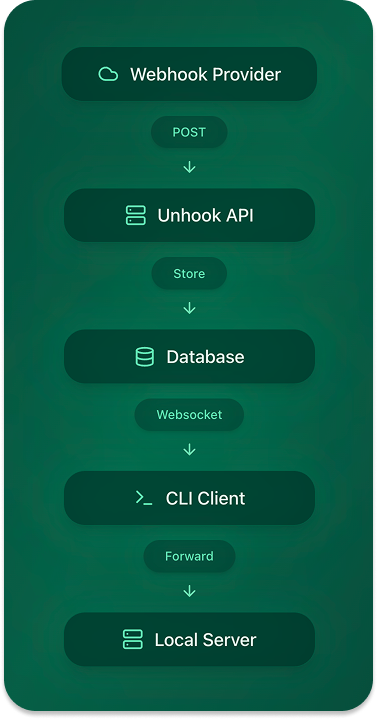
Unhook consists of several key components working together to provide seamless webhook development:
## Data Flow Steps
* Provider sends webhook to `https://unhook.sh/t_123?e=ENDPOINT`
* API validates the API key and processes the request
* Event is stored in the database
* CLI clients subscribe to new events
* Database triggers notify connected clients
* Events are delivered to local development servers
* CLI delivers requests to specified port or URL
* Responses are captured and stored
* Results are visible in the dashboard
## Database Schema
### Core Entities
#### Users and Organizations
#### Webhooks and Connections
### Key Tables
#### Users
```typescript theme={null}
interface User {
id: string;
email: string;
firstName?: string;
lastName?: string;
online: boolean;
lastLoggedInAt?: Date;
}
```
#### Organizations
```typescript theme={null}
interface Org {
id: string;
createdByUserId: string;
clerkOrgId?: string;
}
```
#### Webhooks
```typescript theme={null}
interface Webhook {
id: string;
clientId: string;
port: number;
status: 'active' | 'inactive';
localConnectionStatus: 'connected' | 'disconnected';
config: WebhookConfig;
userId: string;
orgId: string;
}
```
#### Events
```typescript theme={null}
interface Event {
id: string;
webhookId: string;
originalRequest: RequestPayload;
status: 'pending' | 'processing' | 'completed' | 'failed';
retryCount: number;
maxRetries: number;
}
```
### Configuration Types
#### Webhook Configuration
```typescript theme={null}
interface WebhookConfig {
storage: {
storeHeaders: boolean;
storeRequestBody: boolean;
storeResponseBody: boolean;
maxRequestBodySize: number;
maxResponseBodySize: number;
};
headers: {
allowList?: string[];
blockList?: string[];
sensitiveHeaders?: string[];
};
requests: {
allowedMethods?: string[];
allowedFrom?: string[];
blockedFrom?: string[];
maxRequestsPerMinute?: number;
maxRetries?: number;
};
}
```
## Component Architecture
### API Server
The API server handles:
* Webhook reception and validation
* Event storage and distribution
* Authentication and authorization
* Team management
* Real-time updates
### CLI Client
The CLI client manages:
* Local webhook connections
* Event subscription
* Request delivery
* Health monitoring
* Debug logging
### Dashboard
The web dashboard provides:
* Real-time event monitoring
* Team management
* Configuration controls
* Analytics and debugging
* Request/response inspection
## Security Model
1. **API Authentication**
* API keys for webhook endpoints
* JWT tokens for dashboard access
* Role-based access control
2. **Data Privacy**
* Configurable header filtering
* Request/response body size limits
* Sensitive data redaction
3. **Team Access**
* Organization-based isolation
* Member role management
* Shared webhook endpoints
## Scaling Considerations
1. **Database**
* Real-time notification system
* Event archival strategy
* Connection pooling
2. **API Layer**
* Request rate limiting
* Load balancing
* Regional distribution
3. **Event Processing**
* Retry mechanisms
* Failure handling
* Queue management
## Development Setup
For local development:
1. **Database**
```bash theme={null}
# Start Postgres
docker compose up db
```
2. **API Server**
```bash theme={null}
# Start API server
npm run dev:api
```
3. **CLI Development**
```bash theme={null}
# Build and run CLI
npm run dev:cli
```
## Best Practices
1. **Event Handling**
* Implement proper retry logic
* Handle timeouts gracefully
* Log relevant debugging info
2. **Security**
* Rotate API keys regularly
* Monitor failed attempts
* Review access logs
3. **Team Workflow**
* Use meaningful client IDs
* Configure appropriate timeouts
* Set up health checks